Add TOPKHOJ on Google:
 Preferred Source
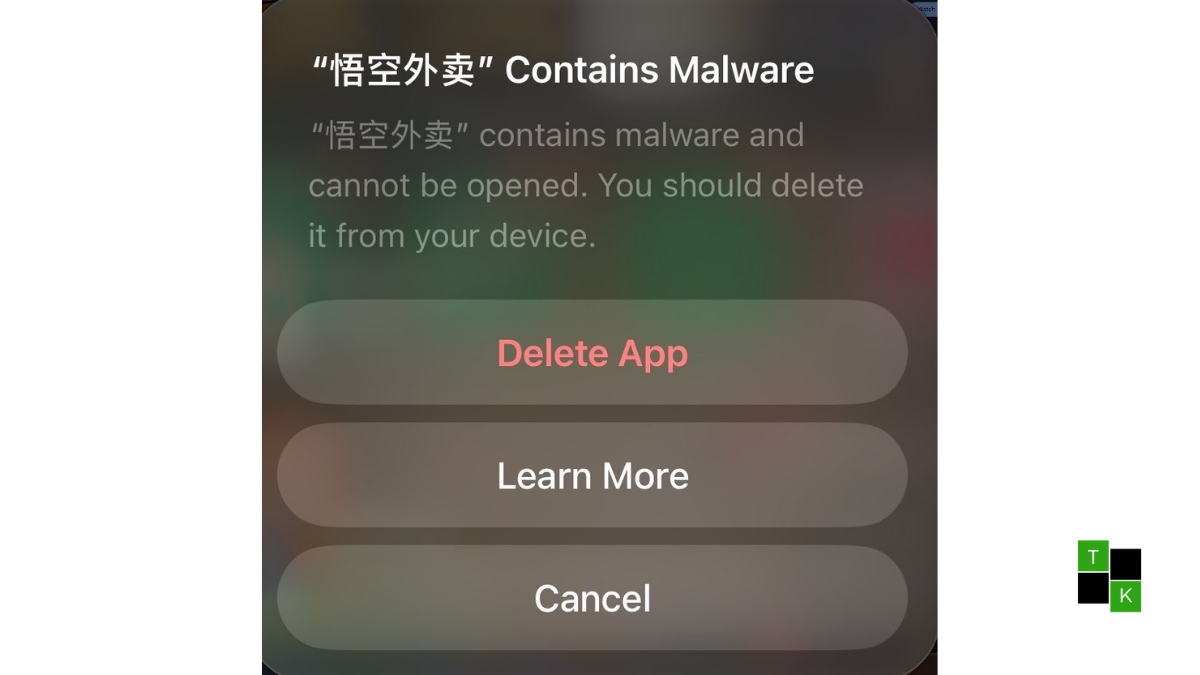
An ordinary food delivery order is the last place smartphone owners expect to encounter cryptocurrency wallet theft. Yet Apple has recently blocked the Wukong food delivery app on iOS and triggered system-level warnings instructing users to delete it from their devices after discovering the software secretly scanned photo libraries for crypto recovery phrases.
Widely used by Chinese communities and expatriates across China, Thailand, Malaysia, Vietnam, and Sri Lanka-boasting over 135,000 registered users and roughly 55,000 monthly active users-Wukong operated as a functional delivery platform while embedding hidden text-recognition frameworks linked to the notorious SparkCat malware campaign.
How Wukong Used OCR and Support Chats to Steal Crypto Keys
Rather than attempting to breach iOS app sandboxing or hack dedicated hardware wallets, Wukong exploited a widespread user habit: saving screenshots of cryptocurrency recovery phrases in the camera roll.
- Pretext Photo Permission Requests: Inside the app, Wukong prompted users to grant access to their photo library under routine pretexts-such as uploading images inside customer support chats.
- Background OCR Scanning: Once granted full gallery access, an embedded Optical Character Recognition (OCR) module powered by Google’s ML Kit scanned stored photos and screenshots for 12- or 24-word BIP-39 mnemonic seed phrases and private keys across multiple languages, including Chinese, English, Japanese, and Korean.
- Silent Exfiltration: Whenever the OCR engine matched keywords or word-length rules fetched from a command-and-control (C2) server, it silently uploaded both the extracted text and the original screenshot along with device metadata to attacker-controlled servers.
Ties to the SparkCat Campaign & App Store Re-Appearance
Security analysts link Wukong directly to SparkCat, a cross-platform mobile stealer Trojan first uncovered by Kaspersky in February 2025 as the first known OCR-based malware to infiltrate Apple’s App Store.
- Apple’s Block & Delete Warning: Following detection, Apple revoked the original app’s execution privileges on iOS, preventing users from launching it and displaying prompts urging them to uninstall the software immediately.
- Resurfacing Under a New Publisher: Despite the takedown, Wukong returned to the Apple App Store in October 2026 under a different publisher account registered as PGI CIPTA SDN BHD, subsequently releasing version 1.0.7 on November 24, 2026. The latest update notes cite checkout bug fixes, crash resolutions, and UI improvements, making no mention of prior security incidents.
Threat Profile: SparkCat OCR Malware vs. Traditional Crypto Phishing
| Security Dimension | Wukong / SparkCat OCR Malware | Traditional Crypto Phishing / Fake Wallets |
| Disguise / Cover | Legitimate Food Delivery & Everyday Apps | Cloned DeFi sites, fake wallet apps, airdrop links |
| Attack Vector | Photo Library Permission + Background OCR | Tricking users into typing seed phrases manually |
| Target Data | Screenshots of 12/24-Word Seed Phrases & Keys | Active wallet approvals & typed mnemonics |
| Technical Stealth | Obfuscated Frameworks + Rust C2 Networking | Domain spoofing & malicious smart contracts |
| Store Vetting Bypass | Fetches OCR Keyword Rules Dynamically Post-Install | Often flagged quickly by URL/brand blacklists |
| Remediation Required | Immediate Wallet Migration to New Seed Phrase | Revoking token approvals or migrating funds |
Essential Security Steps for iOS and Crypto Users
Because cryptocurrency transactions are irreversible and a leaked seed phrase gives attackers permanent control over a wallet, anyone who has ever installed Wukong-or similar regional delivery and messaging apps-should take immediate precautions:
- Never Store Seed Phrases in Photos or Cloud Notes: Delete any screenshots or camera photos of 12- or 24-word recovery phrases immediately. Write recovery phrases offline on paper or stamped metal, or store credentials inside a dedicated, encrypted hardware wallet.
- Migrate Compromised Wallets Immediately: Simply deleting an infected app does not revoke access if your seed phrase screenshot was already uploaded. If you ever granted Wukong full photo access while a seed phrase image was on your phone, create a brand-new wallet on a clean device and transfer all funds out immediately.
- Restrict iOS Photo Permissions to “Limited Access”: On iPhone, never grant third-party food, shopping, or utility apps Full Access to your photo library. Always select Limited Access so apps can only view the specific image you choose to share in a support chat.
🚨 Stay Updated with TopKhoj! 🚨
Get the latest tech news, deals, and exclusive offers first!
📰 Visit News Section📲 Join our Telegram Channel for real-time updates and best deals!
🔗 Join Telegram Now💡 Stay informed and never miss a great deal with TopKhoj!
⚠️ Disclaimer: Any link provided in the article related to a product or service will redirect you to our affiliate partner(s)' website, which are affiliate links. This means that if you make a purchase through these links, we may earn a commission at no extra cost to you. This commission helps support our blog and our work.
🔔 All prices mentioned above are subject to change based on current offers and availability on e-commerce platforms. Please check the latest price and product details on the product page before making a purchase.