Add TOPKHOJ on Google:
 Preferred Source
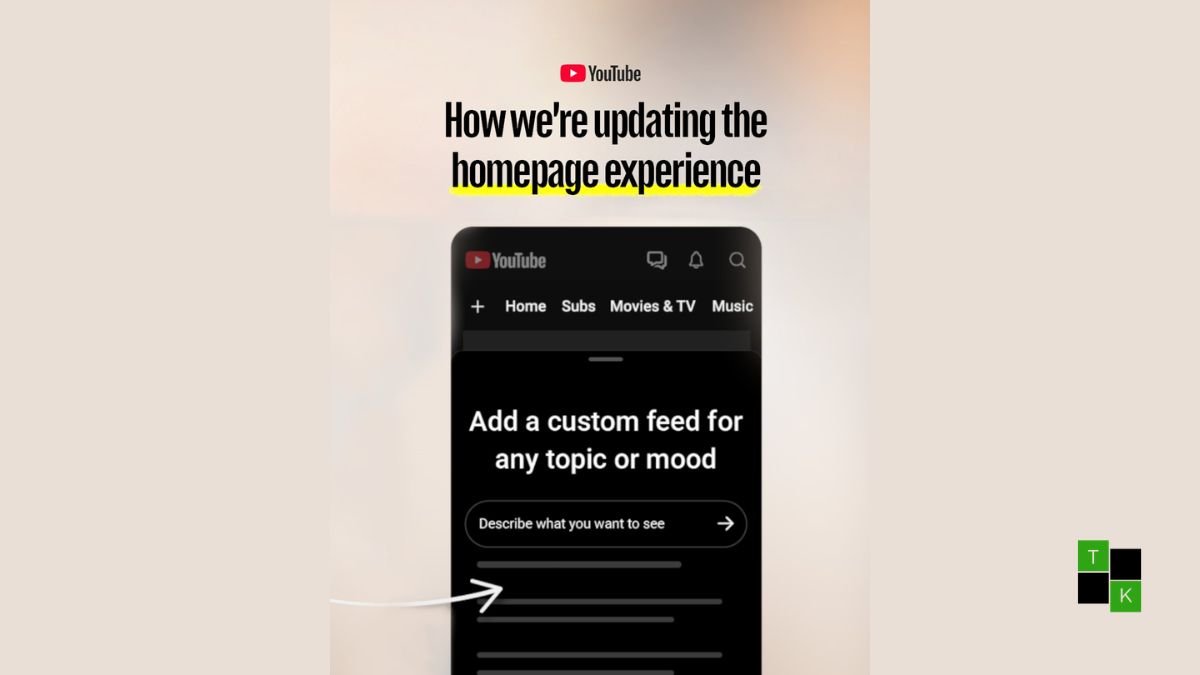
YouTube has formally deployed a major redesign of its core recommendation experience, shifting away from passive algorithmic guessing toward user-directed curation with the launch of YouTube custom feeds. Rolled out alongside a broader homepage interface refresh on October 22, 2026, the feature allows viewers to construct dedicated, continuously updating video feeds by describing content types, ambient moods, or niche interests in natural language rather than relying on generic keyword tags.
The update represents a fundamental philosophical pivot for the world’s largest video platform.
Instead of trapping viewers in a singular, automated recommendation cycle, the YouTube homepage redesign lets users pin persistent, personalized channels directly to the top of their screen.
The rollout also brings an extensive navigation restructure: traditional horizontal topic chips are being phased out, the navigation drawer has been streamlined, and the primary Subscriptions tab has been relocated to the top navigation bar alongside dedicated hubs for Live, Music, and Movies & TV.
However, with Google capping free accounts at three custom feeds while reserving eight for YouTube Premium subscribers-and moving critical mobile buttons to the top of the screen-the update has sparked both enthusiasm and ergonomic criticism.
Algorithmic Control: Building Feeds with Prompts, Moods, and Vibes
For nearly two decades, YouTube’s recommendation architecture has operated as a black box: the platform analyzed your watch history, search queries, and session times to predict what might keep you watching. Custom Feeds put control directly into the user’s hands:
- Natural-Language Feed Construction: Rather than selecting from rigid, pre-generated category pills like “Gaming” or “Podcasts,” users can click a “+” button at the top of the homepage and type open-ended descriptions. Prompts can range from hyper-specific instructional requests (“Help me unwind after work with guided meditations under 10 minutes”) to aesthetic vibes (“Cozy lo-fi beats with rainy cafe background visuals”).
- Dynamic, Continuous Curation: Custom feeds are not static search playlists. Once generated, the feed continuously refreshes with newly published content matching the underlying context of the prompt.
- Seamless Cross-Device Synchronization: Feeds created on the YouTube mobile app automatically sync to desktop web sessions (and vice versa) as long as the user is signed into the same Google account.
- The 30-Day Inactivity Rule: To prevent abandoned prompts from cluttering backend resources, YouTube has implemented a 30-day inactivity expiration policy. If a user does not open or view a specific custom feed for 30 consecutive days, that feed tab will automatically expire and be removed from the top bar.
Account Tiering: 3 Feeds for Free Users vs. 8 for YouTube Premium
As part of Google’s ongoing effort to drive value to its paid subscription tiers, access to custom feeds is split between free and paid members:
- Free Account Allotment: Standard, non-paying signed-in users can maintain up to 3 active custom feeds simultaneously. If a free user wants to add a fourth feed, they must delete or edit an existing one.
- YouTube Premium Allowance: Subscribers to YouTube Premium and YouTube Premium Family can create and save up to 8 custom feeds across their account.
- Watch History and Monetization Integrity: Watching videos inside a custom feed behaves identically to the standard Home feed: viewed videos are appended to standard watch history, and creator views, watch hours, and monetization metrics are credited normally.
Navigation Restructure: Subscriptions Move to the Top Bar
Alongside custom feeds, the physical layout of the YouTube interface has undergone its most visible shakeup since the introduction of the Shorts shelf:
- Subscriptions (“Subs”) Relocation: Historically accessible via a dedicated icon on the bottom navigation bar on mobile, Subscriptions (now shortened simply to “Subs”) has been moved directly into the top bar on the Home tab. This places a user’s followed creators on the same horizontal plane as the new custom feeds.
- Dedicated Media Shortcuts: The top navigation bar now features streamlined quick-access tabs for Live streams, Music, and Movies & TV (visible to users with eligible subscriptions or rentals).
- Retirement of Topic Chips: The horizontal row of algorithmic keyword pills that previously occupied the top of the feed has been decommissioned. Custom feeds now occupy this prime screen real estate.
- Simplified Side Drawer: On desktop and web, secondary menus have been simplified to declutter the viewport and keep focus centered on the video grid.
Rollout Roadmap and Platform Constraints
While the redesign is actively reaching consumer devices, the rollout is subject to regional and technical restrictions:
- Geographic & Language Boundaries: Custom feeds are currently available strictly in the United States and in the English language. Wider international deployments across India, Europe, and Latin America are scheduled for subsequent rollout phases.
- Mobile & Desktop First (Tablets Excluded): The feature is supported on Android smartphones, iPhones, and desktop web browsers. YouTube has explicitly noted that custom feeds are not yet supported on tablets (iPads and Android tablets) or smart TV living room clients.
- Account Prerequisites: To generate or use custom feeds, users must be signed in with an active Google account and must have YouTube Watch and Search History enabled. Users who browse with history paused will not have access to the custom feed builder.
Standard Algorithm vs. Topic Chips vs. Custom Feeds
| Feature Dimension | Standard Home Algorithm | Legacy Topic Chips (Phased Out) | New Custom Feeds (2026) |
| Recommendation Driver | Automated watch history & click habits | Broad, static automated categories | Natural-language user prompts & vibes |
| Curation Control | Zero direct user control | Selection from system-defined pills | Fully customizable and user-edited |
| Account Storage Limit | 1 Default Feed | Unlimited (System populated) | 3 (Free Users) / 8 (Premium Members) |
| Persistence & Expiration | Permanent | Dynamic based on active session | Pinned tabs; expires after 30 days idle |
| Screen Placement | Main viewport | Below top bar | Pinned directly to top navigation bar |
| Hardware Availability | All screens (Mobile, Web, TV, Tablet) | All screens | Mobile & Desktop (Tablets Excluded) |
| Language & Region | Global / Multi-language | Global / Multi-language | US Only (English Language at Launch) |
Community Reaction: Algorithmic Escape vs. Ergonomic Friction
The response across YouTube creator forums, Reddit, and social media has been polarized, reflecting a classic tension between feature utility and UI ergonomics:
- The Praise (Escaping the “Rabbit Hole”): Viewers who use YouTube for multiple distinct purposes-such as work research, fitness workouts, and evening entertainment-have lauded the update. Being able to isolate “Deep Technical Documentaries” from “Casual Comedy” in separate tabs without letting one compromise the recommendations of the other is viewed as a major breakthrough for platform utility.
- The “Thumb Reach” Dilemma: The biggest point of friction centers on mobile ergonomics. Moving the Subscriptions button from the bottom navigation bar to the very top of the screen makes one-handed operation on modern 6.7-inch and 6.8-inch smartphones noticeably more awkward. Users must now stretch their thumbs or use two hands just to check their subscriber feed.
- Monetization and Creator Concerns: While YouTube confirmed that views from custom feeds monetize normally, niche creators have expressed cautious optimism that prompt-based feeds will help high-effort, specialized channels reach dedicated audiences who are otherwise overlooked by the broad, click-driven main homepage algorithm.
If you are a signed-in user in the United States, look for the new “+” icon at the top left of your mobile app or desktop home screen to set up your first custom feed tab.
🚨 Stay Updated with TopKhoj! 🚨
Get the latest tech news, deals, and exclusive offers first!
📰 Visit News Section📲 Join our Telegram Channel for real-time updates and best deals!
🔗 Join Telegram Now💡 Stay informed and never miss a great deal with TopKhoj!
⚠️ Disclaimer: Any link provided in the article related to a product or service will redirect you to our affiliate partner(s)' website, which are affiliate links. This means that if you make a purchase through these links, we may earn a commission at no extra cost to you. This commission helps support our blog and our work.
🔔 All prices mentioned above are subject to change based on current offers and availability on e-commerce platforms. Please check the latest price and product details on the product page before making a purchase.